Microsoft 365 Pricing Update: What’s Changing and How to Prepare

Shawn Akins • February 11, 2026
Connect with us

A straightforward look at the upcoming increase and what renewal timing means for your business

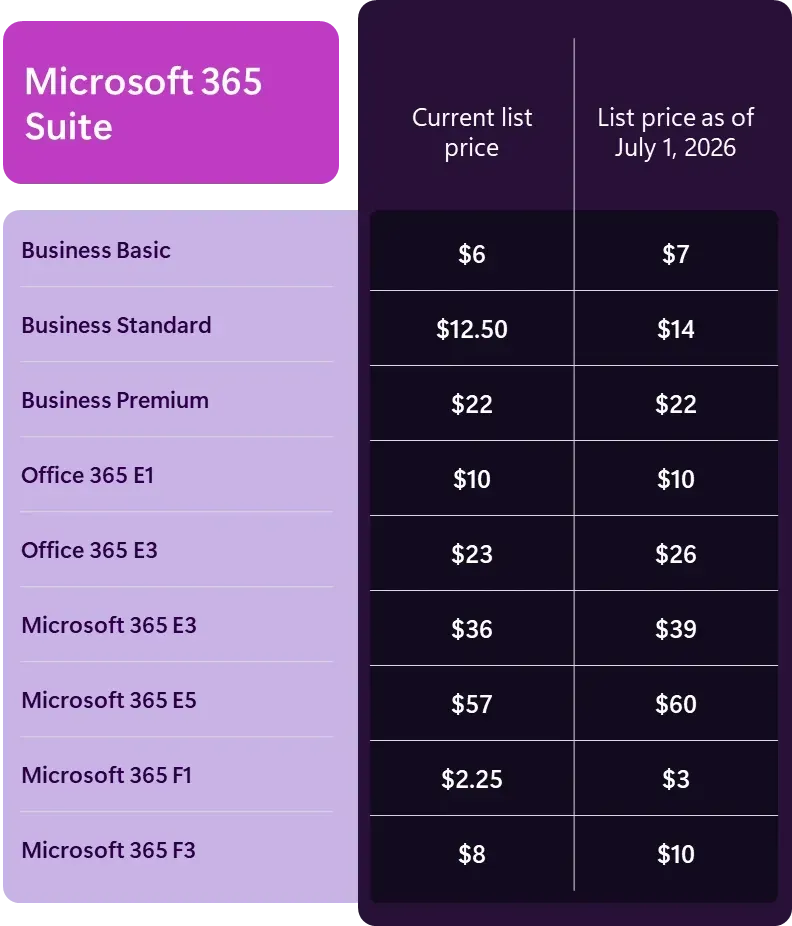
Microsoft has announced a price increase for Microsoft 365 commercial subscriptions, effective July 1, 2026. Like most vendor price changes, this isn’t welcome news but it is something businesses should plan for.

The increase applies across Microsoft 365 and Office 365 business and enterprise plans. Microsoft has tied the change to ongoing platform evolution, but regardless of the reasoning, the practical takeaway is simple: Microsoft 365 will cost more starting mid‑2026.


One Important Detail About Renewals

If your subscription renews before July 1, 2026, you will keep your current pricing for the full term of that renewal. The new July 2026 pricing would not apply until your next renewal after that date.

That said, some customers already renewed under previous pricing adjustments. In those cases, pricing may still increase at the next renewal, but not necessarily to the new July 1, 2026 pricing levels. The exact impact depends on when your last renewal occurred and which pricing tier you’re currently on.


What’s Being Added to Microsoft 365

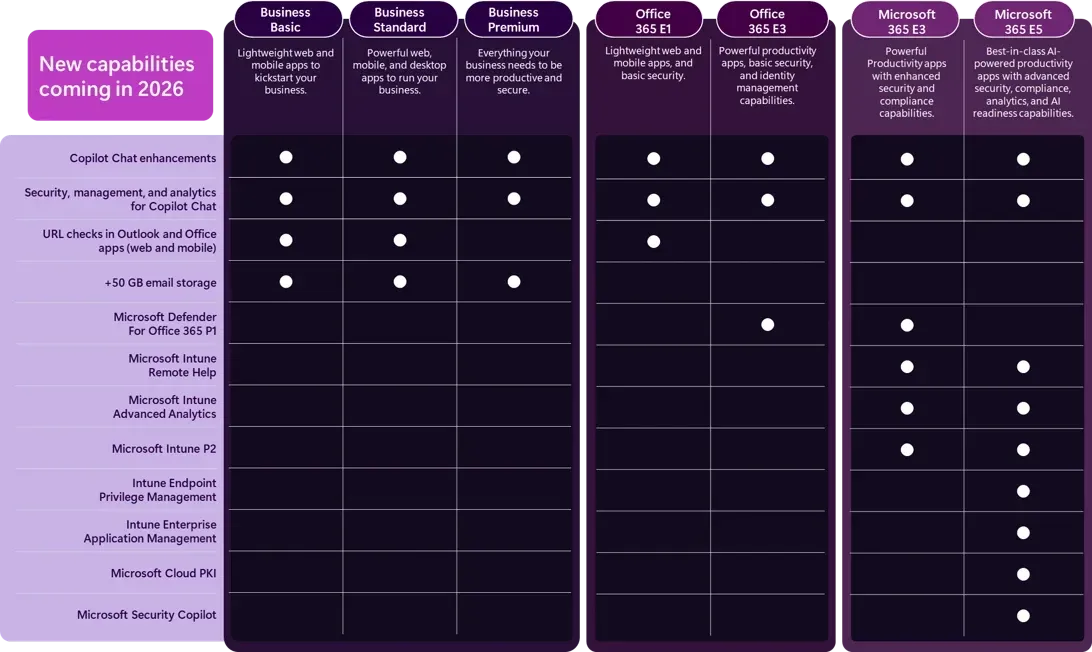
Alongside the pricing change, Microsoft is rolling out new capabilities across Microsoft 365 in 2026, primarily in three areas: AI, security, and device management. These updates will be included directly in existing plans rather than offered only as add‑ons.


Key changes include:

  • Expanded Copilot Chat integration
    Copilot Chat is becoming more deeply embedded into Word, Excel, PowerPoint, Outlook, and OneNote, with added context from email and calendars and new “Agent Mode” capabilities for more advanced tasks. IT administrators will also gain additional controls to manage and govern Copilot usage.
  • Stronger email and collaboration security by default
    Microsoft is adding Microsoft Defender for Office 365 Plan 1 capabilities to Office 365 E3 and Microsoft 365 E3, expanding phishing, malware, and malicious link protection. URL protection is also being extended to lower‑tier plans such as Business Basic and Business Standard.
  • Additional endpoint and device management tools
    Microsoft is folding more endpoint management capabilities into Microsoft 365 E3 and E5, giving IT teams more built‑in tools to manage devices, troubleshoot issues, and reduce security risk without relying as heavily on separate products.


While these capabilities may be useful for some organizations, not every business will benefit equally which is why reviewing licensing and actual usage matters more than feature lists.


How Akins IT Helps

At Akins IT, our focus isn’t selling features, its helping clients pay only for what they actually need. We help businesses:

  • Understand how Microsoft’s pricing changes affect their environment
  • Identify unused or misaligned licenses
  • Plan renewals strategically to reduce cost impact


If you’d like us to review your Microsoft 365 licensing or renewal timeline, we’re happy to help you plan ahead. No surprises, no sales spin.



Schedule License Review
By Shawn Akins January 14, 2026
How Akins IT Helped a Wildfire‑Displaced School Restore Learning, Rebuild Infrastructure, and Strengthen Its Future
By Shawn Akins October 20, 2025
October 20, 2025 — Early today, Amazon Web Services experienced a major incident centered in its US‑EAST‑1 (N. Virginia) region. AWS reports the event began around 12:11 a.m. PT and tied back to DNS resolution affecting DynamoDB , with mitigation within a couple of hours and recovery continuing thereafter. As the outage rippled, popular services like Snapchat, Venmo, Ring, Roblox, Fortnite , and even some Amazon properties saw disruptions before recovering. If your apps or data are anchored to a single cloud, a morning like this can turn into a help‑desk fire drill. A multi‑cloud or cloud‑smart approach helps you ride through these moments with minimal end‑user impact. What happened (and why it matters) Single‑region fragility: US‑EAST‑1 is massive—and when it sneezes, the internet catches a cold. Incidents here have a history of wide blast radius. Shared dependencies: DNS issues to core services (like DynamoDB endpoints) can cascade across workloads that never directly “touch” that service. Multi‑cloud: practical resilience, not buzzwords For mid‑sized orgs, schools, and local government, multi‑cloud doesn’t have to mean “every app in every cloud.” It means thoughtful redundancy where it counts : Multi‑region or multi‑provider failover for critical apps Run active/standby across AWS and Azure (or another provider), or at least across two AWS regions with automated failover. Start with citizen‑facing portals, SIS/LMS access, emergency comms, and payment gateways. Portable platforms Use Kubernetes and containers, keep state externalized, and standardize infra with Terraform/Ansible so you can redeploy fast when a region (or a provider) wobbles. (Today’s DNS hiccup is exactly the kind of scenario this protects against.) Resilient data layers Replicate data asynchronously across clouds/regions; choose databases with cross‑region failover and test RPO/RTO quarterly. If you rely on a managed database tied to one region, design an escape hatch. Traffic and identity that float Use global traffic managers/DNS to shift users automatically; keep identity (MFA/SSO) highly available and not hard‑wired to a single provider’s control plane. Run the playbook Document health checks, automated cutover, and comms templates. Then practice —tabletops and live failovers. Many services today recovered within hours, but only teams with rehearsed playbooks avoided user‑visible downtime. The bottom line Cloud concentration risk is real. Outages will happen—what matters is whether your constituents, students, and staff feel it. A pragmatic multi‑cloud stance limits the blast radius and keeps your mission‑critical services online when one provider has a bad day. Need a resilience check? Akins IT can help you prioritize which systems should be multi‑cloud, design the right level of redundancy, and validate your failover plan—without overspending. Let’s start with a quick, 30‑minute review of your most critical services and RPO/RTO targets. (No slideware, just actionable next steps.)
By Shawn Akins October 13, 2025
How a Zero-Day in GoAnywhere MFT Sparked a Ransomware Wave—and What Mid-Sized IT Leaders Must Do Now
More Posts